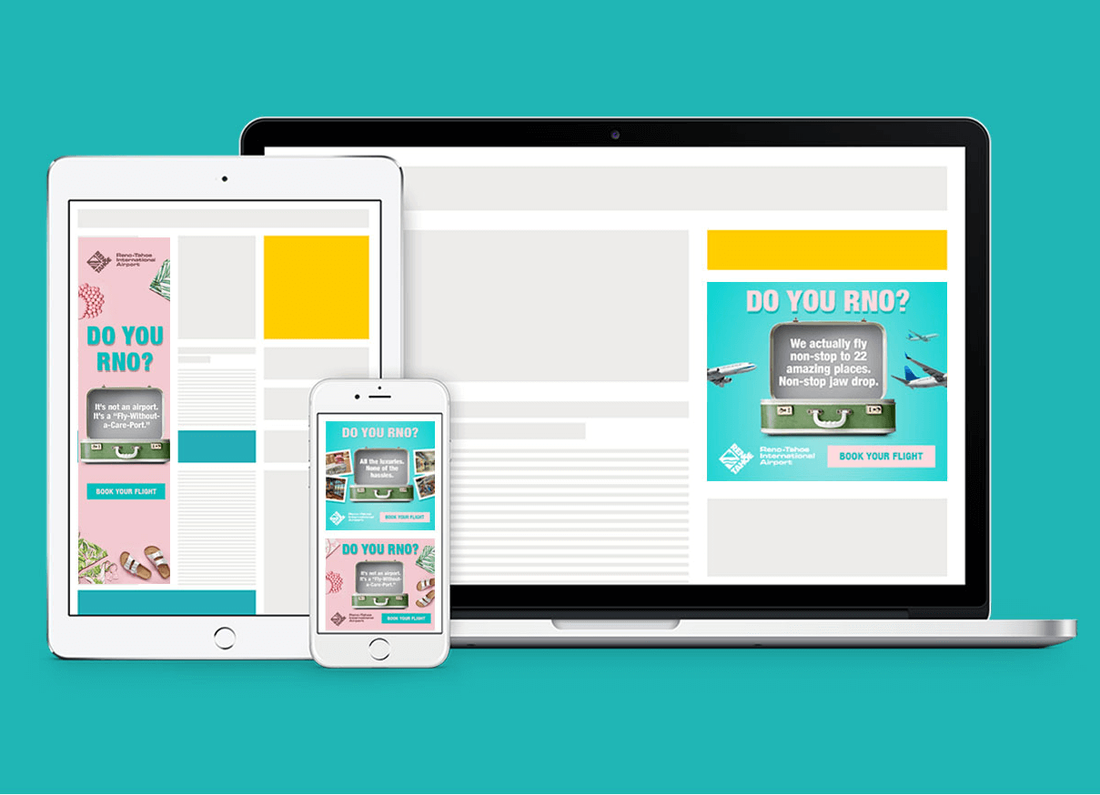
#GOOGLENEWBIE: IMPORTANT TIPS TO KNOW IN USING GOOGLE DISPLAY ADS
2/24/2021

- Text Ads: These simply have a headline and two lines of ad copy.
- Image Ads: These are ads that have an image that can fit the chosen display ad space. They usually have text on a background image or color.
- Video Ads: These are the video ads that are displayed on YouTube, as it is a part of the Google Display Network.
- Rich Media Ads: These ads have some form of interactive elements or animation that encourages users to interact and engage with the content.
- 200 ⨯ 200 - Small Square
- 240 ⨯ 400 - Vertical Rectangle
- 250 ⨯ 250 - Square
- 250 ⨯ 360 - Triple Widescreen
- 300 ⨯ 250 - Inline Rectangle
- 336 ⨯ 280 - Rectangle
- 580 ⨯ 400 - Netboard
- 120 ⨯ 600 - Skyscraper
- 160 ⨯ 600 - Wide Skyscraper
- 300 ⨯ 600 - Half-page Ad
- 300 ⨯ 1050 - Portrait
- 468 ⨯ 60 - Banner
- 728 ⨯ 90 - Leaderboard
- 930 ⨯ 180 - Top Banner
- 970 ⨯ 90 - Large Leaderboard
- 970 ⨯ 250 - Billboard
- 980 ⨯ 120 - Panorama
- 300 ⨯ 50 - Mobile Banner
- 320 ⨯ 50 - Mobile Banner
- 320 ⨯ 100 - Large Mobile Banner
- Log into your Google AdWords account and go to the “Campaigns” tab in the left menu.
- You will see an option to create a new campaign.
- Click on the (+) sign and you will see a new page where you will be asked to select your Google Display Advertising campaign goals.
- Next, you will be prompted to select the type of campaign--display or video.
- Select the “display” option and continue.
- You will next reach a page where you can adjust all the settings and set requirements for your Google Display Advertising campaign.
- You can select the locations, languages, budget, bidding strategy, ad rotation preferences, ad schedule, etc.
- For ad rotation, select the option that optimizes the ad rotation to display only the best-performing ads.
- Next, you will have to set a duration for your campaign.
- You can also adjust the frequency capping options to limit the number of times an ad is displayed to a user.
- You can also adjust the settings to exclude certain types of content and not display your ads on websites with that content.
- Next comes the part where you actually need to create ad groups and set the preferences for each.
- This is where you need to refine your audience and other targeting options.
- The last part is to set a CPM bid for each ad group.
- After this, you can upload your ad copy and then create the campaign.
- Using a number or statistic in your headlines makes them look more trustworthy and can help you get more clicks.
- You can use a shocking fact or a controversial statement to generate curiosity and make people want to know more.
- Another great way to generate curiosity is to ask a question that your target audience might want an answer to.
- Your headlines should be able to either evoke emotion or at least encourage people to take action. Therefore, you should use action words in your headlines.
- If you have any ongoing offers, mentioning those right in the headline is a tried and tested way to get audience attention.
- Always use high-quality, clear images or videos for your ads.
- Keep the layout clean and simple, without any distractions.
- The ad copy should highlight the most important elements like what you’re offering and the CTA.
- Clearly highlight your USP or key offering in a highly visible manner.
- If your ad aims to sell a product, show a clear product picture, along with the key benefits.
- For video ads and rich media ads, ensure that there is no lag and the visuals are playing smoothly.
- Include your brand logo in your ads. That's a must, but it does not have to be the most dominant part of your ad.
- Use strong action words that encourage people to take action.
- Make use of bright, positive colors that look appealing.
- Ensure that your CTAs are clearly visible and are the main focus of your ad.
- Hire copywriters, if you must, to write catchy, creative one-liners to be used for your CTAs.
- Creating a sense of urgency by emphasizing that an offer is for a limited time, also helps get more clicks.
- Keep it short and simple.
Leave a Reply.
Ready to Maximize Your Google Display Ads?
Let our experts help you create high-performing display campaigns that reach the right audience at the right time.
Get Free Demo